 PotomAndroid ↗
AI-generated editorial illustration, not an app screenshot.
A link remembers where something came from, not why it mattered. Before you save one, add a line for the future version of you: the task, constraint and next step.
Take a repair video. “Backpack zip repair” names the topic, but not the bag, fault or next action. A useful note is: “For the blue backpack: compare the stuck lower corner before buying a replacement.” It is a small decision record.
This is an editorial worked example, not a user study or a promise. The method also works in an ordinary notes app. Potom has separate Link, Title and Note fields for keeping a source beside your reason.
The title is the publisher’s memory; the note is yours
Most titles describe the page for a broad audience. Your future question is usually narrower: Was this the repair for the bag with the jammed bottom corner? Did this recipe avoid dairy? Was this the article I wanted before the design review?
Keep the link with the note so you can check the original material. A note does not replace a source, and a saved address is not a guaranteed archive. If a page, video or account disappears, neither restores it.
The useful unit is one sentence that turns “interesting” into “useful for this situation.” It only needs the clue you are most likely to remember later.
Use a three-part line
Write the note as task + constraint + next step. It does not need to be a complete sentence.
| What to capture | Example |
|---|---|
| Task | “Choose a weekend backpack repair” |
| Constraint | “Lower corner catches; avoid replacing the bag if possible” |
| Next step | “Compare the demonstrated zip type with mine” |
Here are three templates to copy and adapt:
- “For [project]: [constraint]. Next: [small action].”
“For the kitchen shelf: plasterboard wall. Next: check the anchor size.” - “Before [event], decide [question]; account for [condition].”
“Before the trip, decide if this route suits a stroller; account for rain.” - “When [trigger], check [fact] before [decision].”
“At the quarterly review, check the pricing date before recommending it.”
Some links are simply enjoyable or worth reading. “Read on the train Friday” is enough. The aim is to preserve the reason, not manufacture urgency.
A worked example: make the next comparison visible
Imagine you find a repair guide while looking for a solution to a backpack zip. Save the original link. Give it a title you can scan quickly: “Backpack zip repair.” Then add the one line: “For the blue backpack: compare the stuck lower corner before buying a replacement.”
Later, open the source and compare the actual zip, fabric and damage with the guide. A video may show a different construction; a creator’s technique may not suit your bag. The saved note tells you why the guide entered your list. The original source supplies the details you still need to verify.
The same split matters for AI answers. Gemini Apps can show related sources; use them as a route to underlying material, then open and assess it yourself. For a repair, prefer a manufacturer manual, parts information or a competent guide. For changing facts, check the source again when you act. Google’s help page describes the related-sources feature.
Where Potom fits and where it does not
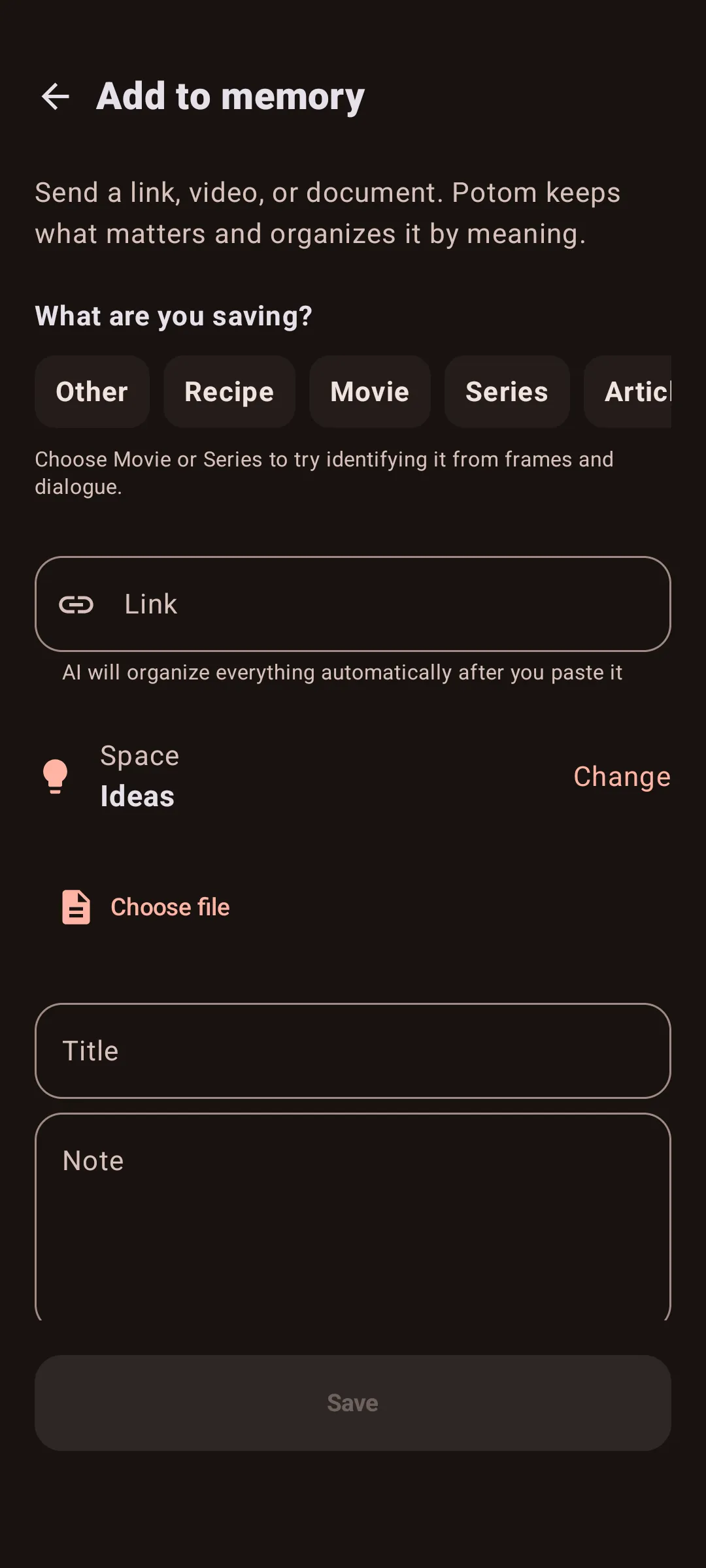
The form has separate fields for a link, title and note, keeping the source and your context together.
On Android, share a supported item to Potom, then review the card and add context while the reason is fresh. If a source cannot be read, its link may still be a useful pointer, but it does not prove processing or preservation. The same pattern works in any notes app.
Potom is a library for material you choose to save, not a record of everything you have seen online. Search your collection with the words you would naturally use, then open the source before relying on it. If the note is vague, improve that one entry rather than rebuilding the system.
Start with the next link, not the backlog
Choose one link you are likely to need this month. Add a title and a single context line. When the relevant moment arrives, use the line to decide whether to open it, then read or watch the original carefully.
If you want a broader starting point, read how to build a simple second brain on Android or what AI bookmarks change and what they do not. If you have a browser export rather than one new link, use the guide to importing browser bookmarks.
Potom’s role is simple: keep a supported source close to the reason you saved it. The decision and the fact-checking remain yours.